Removing Olin Email from your iPhone/iPad/iOS Device
Body
-
On your phone's home screen, select: Settings > Mail > Accounts
-
Select your Olin email account
-
At the bottom of the screen, press Delete Account
-
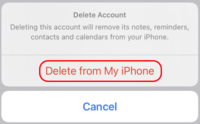
You will see a confirmation page. If you are sure you wish to delete your Olin email from your phone, select Delete from My iPhone. Otherwise, press Cancel.
-
After a few moments, your account will be deleted.
-
If you were deleting your Olin email to reset your phone configuration, you can now continue to Add Olin Email to your iPhone/iPad/iOS Device (link coming soon)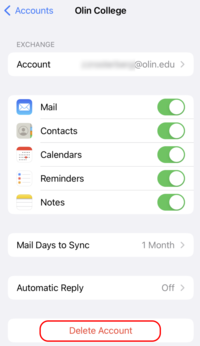
Details
Details
Article ID:
11272
Created
Fri 8/23/24 2:13 PM
Modified
Wed 7/22/26 4:44 PM